Email Preheader (Preview Text): Length and Examples
The email preheader is the preview text next to the subject in the inbox. How long it should be, examples that work, and how to set it so it shows.

An email preheader, also called preheader text or preview text, is the line the inbox shows next to or under the subject before anyone opens the email. You set it in your email platform’s preview text field, or as a hidden line at the very top of the email. If you don’t set one, the inbox uses the first words it finds in the email, which is often “View in browser” or the description of your logo.
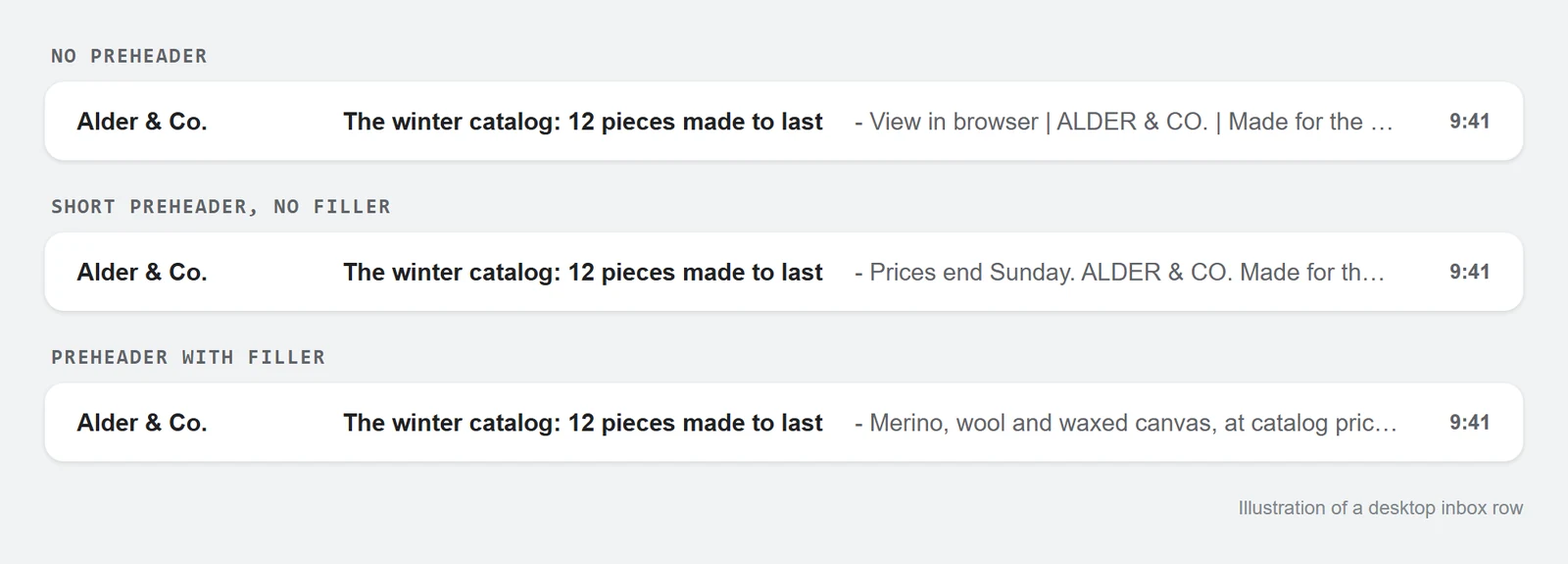
Everyone who sees your subject line also sees the preheader, including the people who never open the email. That makes it the second line of every send.
How to write a good preheader
The subject line gets attention, and the preheader gives the reader a reason to open. Don’t repeat the subject. Add the detail that the subject left out: the deadline, the product, the number, or what’s inside.
| Subject | Weak preheader | Better preheader |
|---|---|---|
| The winter catalog is here | View in browser | Merino, wool and waxed canvas, at catalog prices until Sunday |
| Your order has shipped | Thanks for your order! | Arrives Thursday. Track it or change the address here. |
| 40% off everything warm | Don’t miss out! | Ends Monday at midnight. No code needed. |
| We’re raising prices in March | Important update | Your current price stays until your next renewal. |
| Webinar: email checks in 30 minutes | Join us! | Thursday 5pm CET. We’ll check three real campaigns live. |
The pattern in the right-hand column: a concrete fact the reader can use, and nothing that only makes sense after opening.
For sale season there are 20 ready pairs in Black Friday subject lines with preview text.
How long should a preheader be?
Aim for 40 to 130 characters and put the point in the first 40. Phones show fewer characters than desktop, often 40 to 90 depending on the app and screen. Longer text gets cut off mid-word. Shorter text leaves room that the inbox fills with the start of your email.
The range is a guideline. Before a big send, check the inbox row on a phone, or type your subject and preheader text into our free email preheader checker to see where a phone cuts it.
How to set the preheader
In your email platform. Mailchimp, Klaviyo, Brevo, HubSpot, ActiveCampaign and Omnisend all have a preview text field next to the subject. Fill it in and the platform adds the hidden line for you when it sends.
In a template built outside the platform. If your agency or developer codes the template, ask for a hidden preview line as the very first thing in the email, before the logo and before any “View in browser” link. It should be invisible in the opened email, including in Outlook, and followed by invisible filler. The filler takes up the rest of the preview space, so the inbox doesn’t add the first words of your email after your preheader.
What you see in the inbox, and why
| In the inbox | What happened |
|---|---|
| View in browser, or your logo’s description | No preheader. The inbox used the first words in the email. |
| Your sentence, then the start of the email | The preheader is short and has no filler after it. |
| Your sentence as the first line of the opened email | The preview line isn’t hidden properly. |
| A different preview line in different apps | There are two preheaders: one in the template and one from the platform’s field. |
| Your sentence and nothing else | It works. |
Template or platform field: pick one
When you fill in your platform’s preview text field, the platform adds its own hidden line when it sends. If your template already has one, the email now has two, and different apps may show different ones.
Use one or the other. If the email is built and translated outside the platform, keep the preheader in the template and leave the platform field empty. That way the preheader is translated and reviewed together with the rest of the email.
One preheader per language
In a multilingual email, translate the preheader like the headline, so each language gets its own line. An English preheader in a German inbox is an untranslated sentence in the one place every recipient reads.
After the translations are in, check that no preheader still shows a placeholder like curly braces. A placeholder in the inbox is worse than no preheader at all.
How EmailStitch flags preheader problems
EmailStitch is the email production tool this blog belongs to. Its Review step looks for the hidden preview line in every language version. If it’s there but not hidden, the preview shows the sentence at the top of the email and Review lists a Preheader warning under Fix soon (“Preheader leak”) for each language:

A missing or empty preheader, or one too short to be a sentence, is also listed under Fix soon. A length outside about 40 to 130 characters shows up as a Signal. None of these stop you from publishing. The inbox row on a phone is still the final check.
Before you send
- The preheader is the first text in the email, and hidden in the opened email.
- The sentence is 40 to 130 characters, with the point in the first 40.
- Invisible filler follows the sentence.
- Only one preheader: either the platform field or the template, not both.
- Every language has its own preheader, and none shows a placeholder.
The preheader is the first line readers see. The last one, the unsubscribe link, can be hidden by Gmail’s clipping. Every other pre-send check is on the HTML email QA checklist, and the sale-week version is the Black Friday email checklist.
FAQ
What is the difference between a preheader, preheader text and preview text?
They’re the same thing. “Preheader” and “preheader text” are what email designers call it, and “preview text” is the name most email platforms use for the field.
Does every email need a preheader?
Yes. Without one, the inbox shows whatever text comes first in the email, which is rarely the line you’d choose.
Why is my preheader showing in the email?
The preview line isn’t fully hidden. If you use your platform’s preview text field, remove the visible copy from the template. If the template is coded, ask whoever built it to hide the line in every inbox, Outlook included.
Can I use emoji in a preheader?
Yes. Most inboxes show them. Count each emoji as about two characters toward the length, and don’t rely on one to carry the meaning.