Gmail Clipped Message: Why It Happens and How to Fix It
Gmail cuts emails past about 102 KB and hides the rest, unsubscribe link included, behind View entire message. Why it happens and how to fix it.
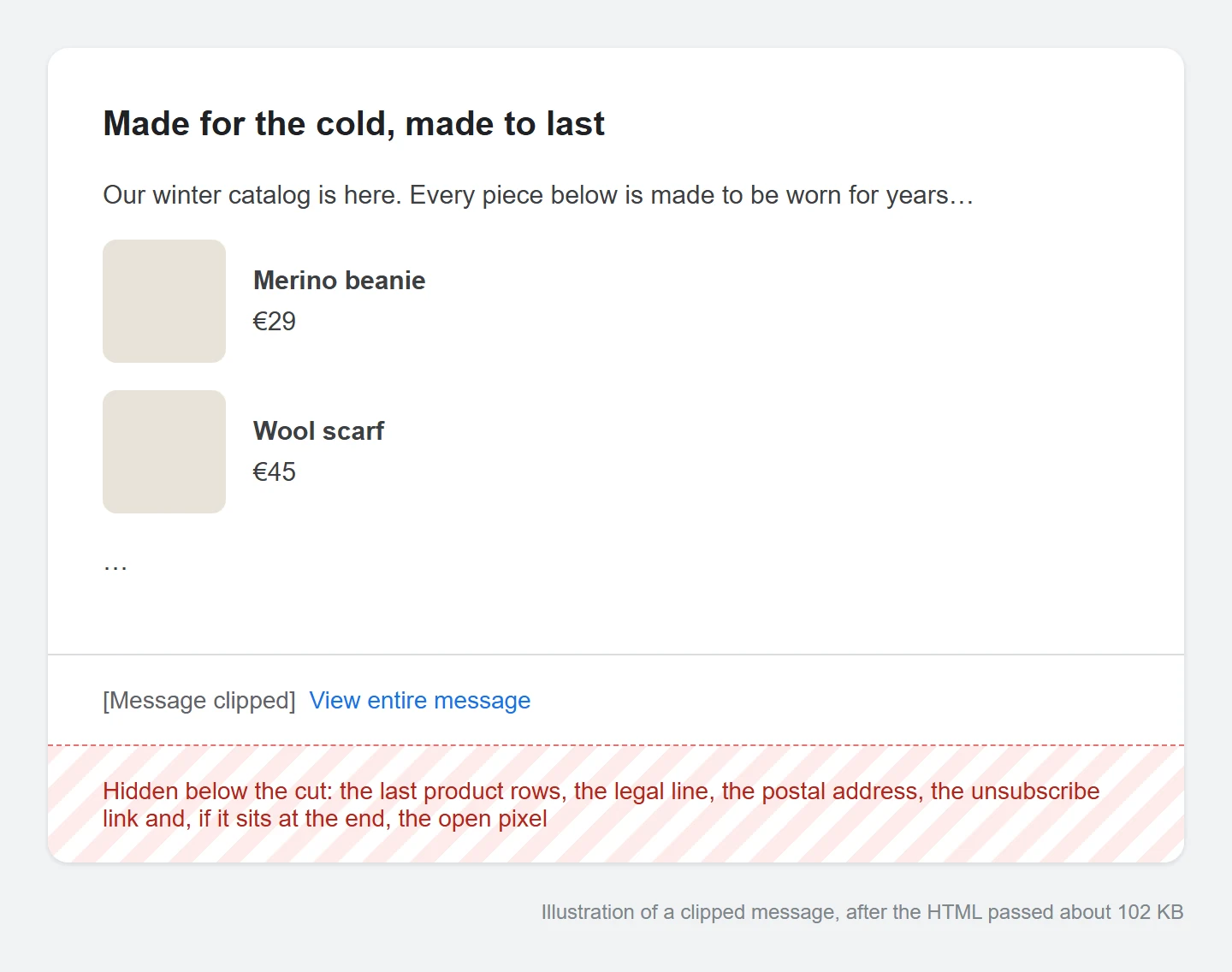
A Gmail clipped message means Gmail cut your email because the email itself is larger than about 102 KB. Gmail shows the top of the message, then [Message clipped] View entire message, and hides the rest. Photos hosted online don’t count toward the limit. The text, the styling, the links and any pictures pasted straight into the email do. The unsubscribe link, the legal footer and the tiny image that records opens all sit at the end of the email, so they’re what disappears.
Google has never published the exact number. About 102 KB is what senders have measured for years, in Gmail on the web and in the Gmail apps. Treat it as a line to stay well under.
This has nothing to do with Gmail’s 25 MB attachment limit. A clipped email has no attachment problem. The email itself is simply too long.
What counts toward the limit
| Counts | Doesn’t count |
|---|---|
| The layout and styling of the email | Photos hosted online |
| Every word of text | Attachments |
| Pictures pasted straight into the email | The subject line |
| The tracking links your email platform adds when it sends |
The last row is the one people miss. Mailchimp, Klaviyo and most other email platforms swap every link for a longer tracking link when they send. A campaign with 40 links can grow by several KB between the version you checked and the one Gmail receives. If your email is at 99 KB, assume Gmail sees more than 102.
What a clipped email costs you
- The unsubscribe link disappears from view. Readers who can’t find it mark the email as spam instead. Gmail’s own unsubscribe button at the top still works, but the link in your footer doesn’t help anyone.
- Opens drop. Opens are counted when a tiny image at the end of the email loads. If it sits after the cut, it only loads for people who click View entire message, so your report shows fewer opens than really happened.
- The legal footer is hidden. Your address and terms are in the email but not on screen.
- The email looks shorter than the one you approved. The last product rows are gone.
Why the translated version clips first
Take one layout in two languages, and say the English version comes out at 96 KB. German has longer words and a longer legal line, and comes out at 104 KB. Only the German version gets clipped, and it’s usually not the one anyone proofread.
The gap grows outside the Latin alphabet. A Russian or Greek letter weighs twice as much as an English one, and a Chinese, Japanese or Korean character three times as much. The same paragraph in Russian can weigh almost double the English one.
Here is one of our demo catalogs: the same template in three languages, with the weight of each version under the preview:
So check the finished version of every language you send. English being under the line tells you nothing about Russian.
How to fix a clipped email
Trim the email itself first. Photos hosted online cost almost nothing, so removing pictures rarely helps.
- Host pictures online instead of pasting them in. One pasted hero image can use the whole budget. Upload it to your email platform’s image library and use that.
- Remove repeated styling. Some builders repeat the same styling on every block of the email. Ask whoever builds your templates to keep it in one place.
- Delete leftovers. Old sections hidden in the email and unused styling still count. Remove them.
- Shrink the export. Most builders have an option to compress the email when you export it. Turn it on.
- Shorten the heaviest language. If one version still crosses the line, cut its footer text or split the campaign in two.
- Move the unsubscribe link up if you accept a clip. A footer link placed above the last product rows survives the cut.
How to check before you send
Check the size of the finished email, with names and translations filled in, for each language. A draft with placeholders weighs less than what you’ll send. Our free Gmail clipping checker shows the size and the line, and the email template tester checks the rest of the email at the same time. Then send the heaviest version to a Gmail test inbox and scroll to the bottom. If View entire message appears, you’re over.
What EmailStitch flags
EmailStitch is the email production tool this blog belongs to. The Build view shows the weight of the language you’re previewing, as in the clip above. Review checks each language version separately. From 90 KB it lists a Gmail clipping warning under High risk, and past 102 KB it warns that the footer and unsubscribe may be hidden. Neither stops you from publishing. The 12 KB margin is there for the tracking links your email platform adds later.
The estimate isn’t Gmail itself. Before a large send, the Gmail test inbox is still the proof.
Before you send
- The finished email in every language is under 90 KB.
- No pictures are pasted straight into the email.
- The unsubscribe link and legal line come before anything you could live without.
- The heaviest language, sent to Gmail, shows no View entire message link.
Clipping is one check on the HTML email QA checklist. If you send in several languages, multilingual email explains why one shared template is easier to keep under the limit than one file per language.
Black Friday emails clip more often than any other campaign, because of product grids, timers and extra small print. The Black Friday email checklist covers this and seven other checks, and Black Friday email design shows real sale emails that stay short.
FAQ
What does “Message clipped. View entire message” mean in Gmail?
The email is larger than about 102 KB, so Gmail shows only the first part. Click View entire message to read the rest. The sender can fix it by making the email smaller.
What is the Gmail clipping limit?
About 102 KB of email. Google doesn’t publish the exact number, so stay under 90 KB and you won’t need to worry about it.
Do images count toward Gmail clipping?
Only pictures pasted straight into the email. Photos hosted online don’t count, however large they are.
Does Gmail clipping affect deliverability?
Not directly. But a hidden unsubscribe link leads to more spam complaints, and complaints do hurt deliverability.
Does the Gmail app clip emails too?
Yes. Gmail on Android and iPhone also clips long messages and shows a link to the full message.